
An Email Collaboration Tool…
What is a mailing list?
A mailing list is simply a list of e-mail addresses of people that are members of the same workgroup. Specifically, members of the Board of Directors for the Pinellas Genealogy Society.
This is a centrally managed BCC list.
When a member of the list sends a note to the group’s address, the e-mail is broadcast to all of the members of the list.
The address is PGSDirectors@PinellasGenealogySociety.com
How to read the email:
Open your regular email program (outlook, yahoo, gmail, etc.)
Look for an email with a subject that begins [PGS Directors]
Open the email. Usually, you click on it.
How to reply to an email:
Click on [Reply]
Your email program will automatically put PGSDirectors@PinellasGenealogySociety.com in the [To] block.
Important:
If you want to reply to only one or two people, then erase PGSDirectors@PinellasGenealogySociety.com and enter the address of the person(s) you want to reach.
Update/Edit the [Subject line.
Add your text.
Click [Send].
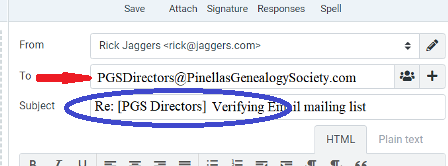
The bottom line is that this is a regular email. You can quickly identify it by looking at the subject line.
How to send an email to the list:
- Open your regular email program (outlook, yahoo, gmail, etc.)
- In the [To] block, enter PGSDirectors@PinellasGenealogySociety.com
- In the [Subject] block, enter something about your message
- In the [Text] area, write what you want to say….
- [Attachments] are allowed, so you can send your monthly reports through the list
- Click on [Send]
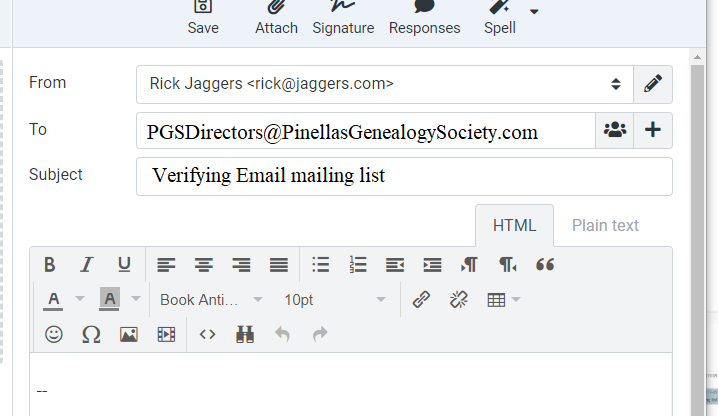
You are done…
…but the mailing list has a few more steps:
First, the PGS website will add [PGS Directors] to the subject line
Next, The website will then forward your message to everyone on the list and deliver it to the recipients’ regular email accounts.
Note: You’re on the list, so you should get a copy, too, at your regular email inbox. (You can tell whether the message is from you or to you by looking at the subject line. If it has been sent [To] you, then the subject line will begin with “[PGS Directors]”)
You should be on the list:
All Board Members as of October 2019 were added to the list. The President and Webmaster are responsible for keeping the list up-to-date, so contact them.
If you are on the Board of Directors, then you can post directly to the list.
Anyone else who uses this address cannot post directly to the list. Their email will be held for Peter or Rick to review it. (If it’s SPAM, then it will be deleted.)
You can change your own mailing list settings!
You can change the following options:
- Here is the link: PinellasGenealogySociety.com Mailman Options
(If you don’t remember your password, then enter your mailing address and click the [Remind] button at the bottom of the page.) - Change your email address
- Change your name
- Unsubscribe
- Change your password
- Additional Subscription Options
- Disable subscription during vacation
- Set Digest mode for once-a-day delivery
- Select HTML or plain text messages
- Get copies of your own posts
- Receive an acknowledgment that your message was received
- Get a monthly password reminder (sent in plain text)
- Conceal yourself from the subscriber list
Note: the only personally identifiable information is your name and email address.